


How to Setup Facebook Livechat in Magento 2?
Do you know customer Chat Facebook is a free application that you can integrate directly into your website for free.
In this post, we will tell you how to set up Facebook Livechat in Magento 2.
But first let’s understand What is Facebook Chat and what are its benefits?
Customer Chat Facebook is a customer chat software that comes with great features such as customer care, consulting, sales, etc directly on Landing Page. All management and customer care is done through Facebook Messenger. It also helps users to chat and receive messages without logging in if the admin sends the message.
Below are a few simple steps to set up Facebook Chat (Live chat Facebook) for your landing page.
How to Setup Facebook Livechat in Magento 2
To Setup Facebook Livechat
- Step 1: Access your Fanpage > enter your domain path > choose Save
- Step 2: Copy and paste the code into the tag of the Landing Page
Step 1: Access your Fanpage > enter your domain path > choose Save
In this step, go to your Fanpage > select Settings > click on Messenger Platform.
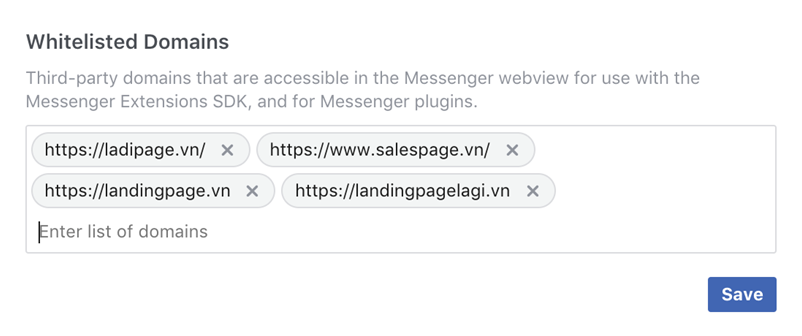
Now, you enter the path of the domain that you want to use in the Whitelisted Domains field. After that, click on Save to complete.
Please follow the image below:
Step 2: Copy and paste the code into the