How To Display Sub Categories On A Category Page In Magento?

By default, Magento will only display subcategories instead of product on a product listing page which is like an obvious option to have but due to some reason it is not possible unless you are aware.
So let’s begin from the top:
1. In your Magento admin navigate to CMS > Static Blocks
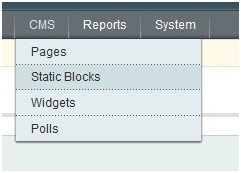
2. Click “Add New Block” at the top right
3. Create a new static block as follows:
Block Title : Sub Category Listing
Identifier : subcategory_listing
Status : Enabled
Content :
{{block type="core/template" template="catalog/navigation/subcategory_listing.phtml"}}
4. Click “Save Block” in the top right
5. Go to the parent category under Catalog > Manage Categories.
6. Select the category that has sub-categories and under the “Display Settings Tab” reflect the following:
Display mode : Static Block only
CMS Block : Sub Category Listing
Is Anchor : No
7. Click “Save Category” at the top right
8. Create a new file called “subcategory_listing.phtml” with the following content:
app/design/frontend/yourpackagename/yourthemename/template/catalog/navigation/
Containing the following code:
<?php
$layer = Mage::getSingleton('catalog/layer');
$_category = $layer->getCurrentCategory();
$_categories = $_category->getCollection()->addAttributeToSelect(array('url_key','name','image','all_children','is_anchor','description'))
->addAttributeToFilter('is_active', 1)
->addIdFilter($_category->getChildren())
->setOrder('position', 'ASC')
->joinUrlRewrite();
?>
<div class="listing-type-list catalog-listing">
<ul id="subcats" class="clear">
<?php foreach ($_categories as $_category): ?>
<?php if($_category->getIsActive()): ?>
<?php Mage::log($_category->debug(), null, 'mylogfile.log'); ?>
<li>
<div class="subcat clearfix">
<a class="now-from-container" href="<?php echo $_category->getURL() ?>"></a>
<div class="subcat-image">
<a href="<?php echo $_category->getURL() ?>" title="<?php echo $this->htmlEscape($_category->getName()) ?>">
<img src="<?php echo $this->htmlEscape($_category->getImageUrl()) ?>" width="190" alt="<?php echo $this->htmlEscape($_category->getName()) ?>" />
</a>
</div>
<div class="subcat-title-container">
<h2><a href="<?php echo $_category->getURL() ?>" title="<?php echo $this->htmlEscape($_category->getName()) ?>"><?php echo $this->htmlEscape($_category->getName()) ?></a></h2>
</div>
</div>
</li>
<?php endif; ?>
<?php endforeach; ?>
</ul>
</div>
9. Make sure your sub categories have an image assigned to them under Catalog > Manage Categories > Sub Category

And that’s how to display a sub category listing on a category page in Magento.
If you do not see the changes, then try clearing your Magento/browser cache. If your sub-categories show no thumbnails then make sure that the images are actually uploaded to your subcategories.